A Pomodoro timer you can tune
Set your work interval, short break, long break and when the long break comes. Add or remove 5 minutes with one click, and set a daily target.
 PomoDuctivity
 is a calm Pomodoro timer for your Windows PC. You promise yourself one focused block, a small always-on-top timer keeps you honest, and a little cat works alongside you until it's time for the break you earned.
A small taste of the app. The Windows version adds the check-in, mini timer, reminders and more.
PomoDuctivity is a Pomodoro timer app for Windows 10 and Windows 11. It splits your work into focused blocks (25 minutes by default) followed by short breaks, with a longer break after every few sessions. All of these lengths can be changed.
Before each session it asks you to commit to one task and to not interrupt yourself. While the session runs, an always-on-top mini timer stays in the corner of your screen, so the timer is still visible when you switch to other apps.
The same four steps every time, so starting gets easier the more you do it.
Choose what this session is for. One task, nothing else.
Tick “I will not interrupt myself” and confirm. A tiny ritual that makes the promise feel real.
Work until the alarm. The mini timer floats on top of your other windows the whole time.
Step away for 5 minutes. After a few rounds, PomoDuctivity gives you a longer break.
Built for Windows with Fluent design, light and dark mode, and support for x86, x64 and ARM64 PCs.
Set your work interval, short break, long break and when the long break comes. Add or remove 5 minutes with one click, and set a daily target.
When you switch apps mid-session, a small timer stays on top. Drag it anywhere, set its opacity, double-click to return to the app.
Turn your screen into a big, calm flip clock for the length of a session. Good on a second monitor.
Not everything fits in 25 minutes. Track open-ended work with the stopwatch, with optional reminders so you still take breaks.
Seven ambient sounds, including rain, forest, sea and thunder, with a volume slider. Or keep the optional ticking clock sound.
Pick a daily goal and a reminder time. Tell the app what steals your focus (procrastination, chat pings, endless videos) and the nudges are written for that.
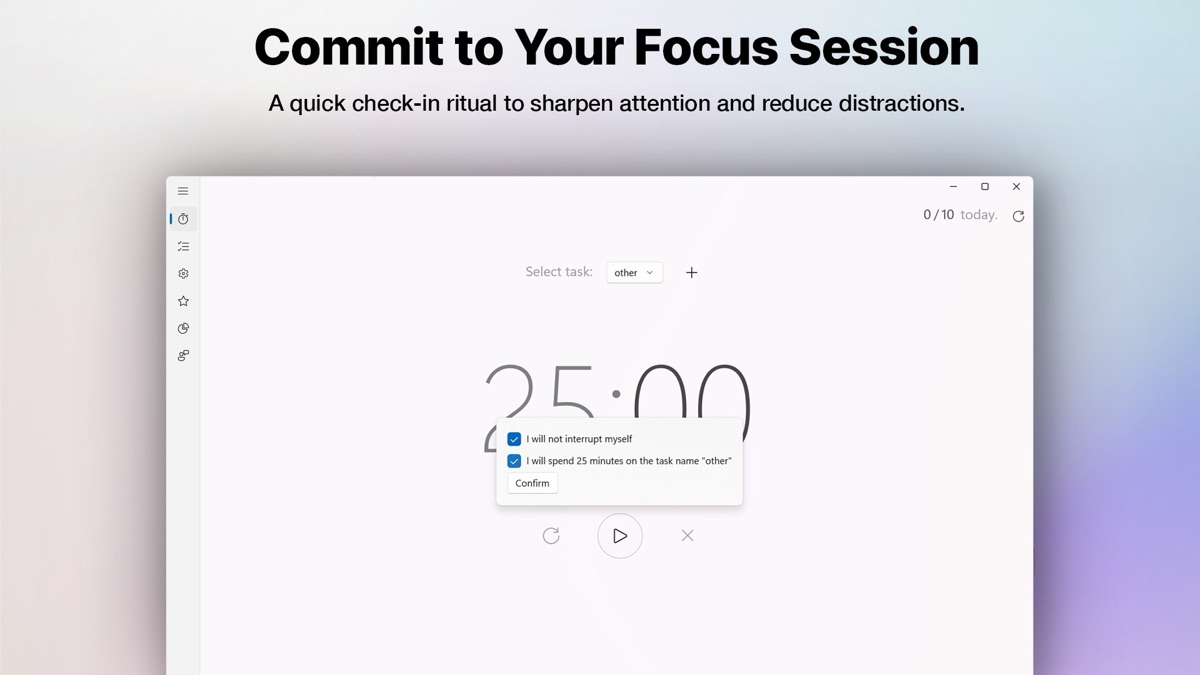
Most timers start the moment you click. PomoDuctivity asks for a two-second check-in first. Saying out loud what you will do, and for how long, is what makes the next 25 minutes stick.
Free to download. Upgrade only if you want the extras.
Prices in USD; taxes may apply. All sales are final, see the refund policy. Pricing details and FAQ.
The Pomodoro Technique is a time-management method where you work on one task for a fixed block of time, usually 25 minutes, then take a short 5-minute break. After about four focus blocks you take a longer break of 15 to 30 minutes. The fixed blocks make it easier to start and the breaks keep your attention fresh through the day.
Yes. PomoDuctivity is free to download from the Microsoft Store. The free version includes the Pomodoro timer with custom intervals, the focus check-in, the stopwatch, the fullscreen flip clock, the mini timer, themes and daily reminders. Pro costs $14.99 per year or $29.99 once for a lifetime license, and adds unlimited tasks, white noise and the cat mini timer.
Yes. PomoDuctivity runs on Windows 10 and Windows 11, on x86, x64 and ARM64 PCs, and installs from the Microsoft Store.
Yes. When you switch to another window during a session, PomoDuctivity can show a small always-on-top mini timer. You can drag it anywhere on screen and adjust its opacity, and double-click it to bring the main window back.
Yes. You can set the work interval, short break, long break and how many sessions come before a long break. On the timer screen you can also add or remove 5 minutes with one click, and set a daily target number of sessions.
PomoDuctivity is available in English, German, Spanish, French, Portuguese and Vietnamese.
Install PomoDuctivity from the Microsoft Store. It's free, and the first session takes less than a minute to set up.
Get PomoDuctivity for Windows